

Store, retrieve, and summarize messages - Neo4j Agent Memory
title: "Extract and inspect entity candidates - Neo4j Agent Memory"
source: "https://neo4j.com/labs/agent-memory/how-to/entity-extraction/"
author:
published:
created: 2026-10-09
description: "Extract and inspect entity candidates - Neo4j Agent Memory"
tags:
- "clippings"
Extract and inspect entity candidates
Runs client-side. The extractors on this page run in your Python process and do not call a memory backend, so they work next to either backend. Configuring them as a MemoryClient extraction pipeline applies only to Bolt: NAMS extracts entities server-side and ignores the client’s extraction settings with a UserWarning. See the backend capabilities reference.
To extract entity candidates with a local model, select a supported domain schema, run extraction on the input, and inspect the returned names and types before persistence.
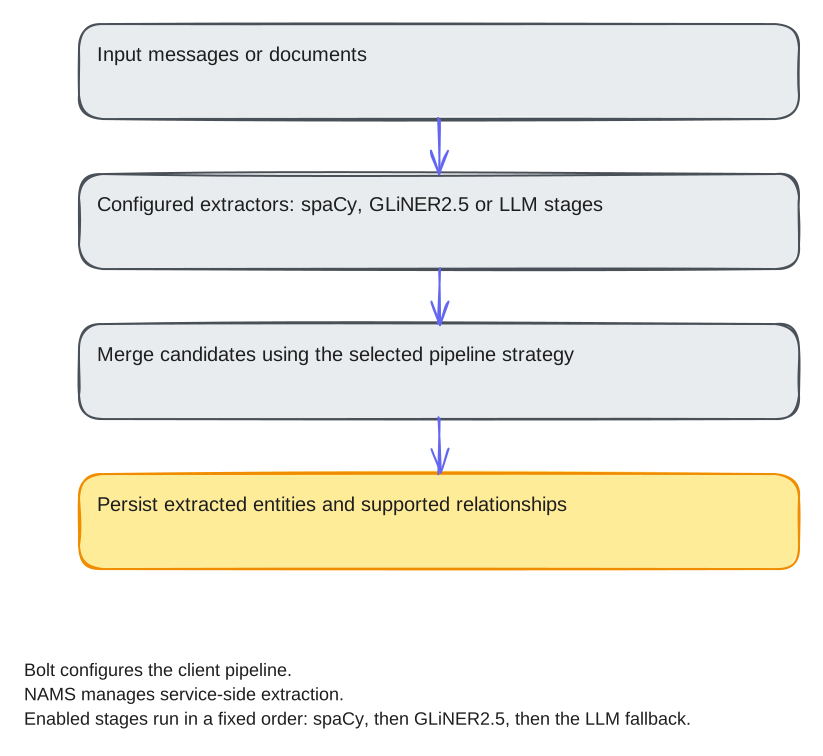 Figure 1. Extraction pipeline: input text, configured extractors, merge strategy, then persisted entities and relationships
For the rationale, see Understanding the extraction pipeline.
1. Install the local extractor
Use Python 3.10 or newer and a POSIX shell. Prepare the example files and install the required extra:
Create a local folder and virtual environment for the examples on this page. The commands reuse an existing environment without changing its files:
bashmkdir -p ~/agent-memory-tutorials
cd ~/agent-memory-tutorials
if [ -e .venv ]; then
printf '%s\n' 'Using the existing virtual environment.'
else
python3 -m venv .venv
fi
source .venv/bin/activate
Expected: ~/agent-memory-tutorials is your working directory and its virtual environment is active. Install the published SDK with the command below.
Each complete code block labelled Save as names a file to create in this folder using your editor. Copy the entire block, including imports and the entry point. Expand each helper disclosure and use Copy code to copy its full source. Keep all files together so their imports resolve.
When continuing from another tutorial or guide, retain the existing environment, configuration, session files, and .tutorial-state/. Reuse unchanged helper files; compare an existing file before replacing it, and finish any pending cleanup or recovery before changing the code that owns its state.
bashpython -m pip install 'neo4j-agent-memory[gliner2]==0.7.0'
The maintained program extraction_recipes.py supplies its own imports, source texts, and event-loop entry point. It downloads the GLiNER2.5 checkpoint fastino/gliner2.5-base-v1 (about 407 MB) on first inference; allow disk space and network access for the download. These commands do not connect to a database or require an LLM API key.
Save the complete program below in agent-memory-tutorials/. It has no local helper imports. The next section explains the selected function.
Complete extraction_recipes.py
python"""Complete local-model extraction recipes without a database or LLM API."""
import argparse
import asyncio
from neo4j_agent_memory.extraction.domain_schemas import DomainSchema, get_schema
from neo4j_agent_memory.extraction.gliner2_extractor import GLiNER2Extractor
from neo4j_agent_memory.extraction.pipeline import ExtractionPipeline, MergeStrategy
from neo4j_agent_memory.extraction.streaming import StreamingExtractor
from neo4j_agent_memory.ontology import RelationshipDef
TEXTS = [
"Maya Chen works at Northstar Robotics in Denver.",
"Ravi Shah joined Summit Research in Boulder.",
]
# tag::schema[]
def custom_extractor():
schema = DomainSchema(
name="support_catalog",
entity_types={"customer": "A named customer", "product": "A named purchased item"},
)
return GLiNER2Extractor(
ontology=schema,
label_mapping={"customer": ("PERSON", None), "product": ("OBJECT", "PRODUCT")},
threshold=0.5,
)
# end::schema[]
# tag::extract[]
async def extract(selected, text):
result = await selected.extract(text, extract_relations=False, extract_preferences=False)
if not result.entities:
raise RuntimeError("No candidate entities; inspect the input/schema/model threshold")
for entity in result.entities:
print(entity.name, entity.type, entity.subtype, entity.confidence)
print(f"Verified: {result.entity_count} candidate entities returned; inspect their accuracy")
return result
# end::extract[]
# tag::relations[]
def relation_extractor():
# The business catalog declares labels only; attach typed relationships.
ontology = get_schema("business").to_ontology(
relationships=[
RelationshipDef(
type="EMPLOYED_BY",
source="person",
target="company",
description="The person works for or has joined this company",
),
RelationshipDef(
type="LOCATED_IN",
source="company",
target="location",
description="The company is based or operates in this place",
),
]
)
return GLiNER2Extractor.for_ontology(ontology, threshold=0.5)
async def relations(selected, text):
result = await selected.extract(text, extract_preferences=False)
if not result.relations:
raise RuntimeError("No relations; check the declared relationships and thresholds")
for relation in result.relations:
print(relation.source, relation.relation_type, relation.target, relation.confidence)
print(f"Verified: {len(result.relations)} candidate relations returned; inspect them")
return result
# end::relations[]
# tag::batch[]
async def batch(selected, texts):
# Propagate stage errors so the batch can distinguish a failed item from an empty extraction.
pipeline = ExtractionPipeline(
stages=[selected], merge_strategy=MergeStrategy.CONFIDENCE, fallback_on_error=False
)
result = await pipeline.extract_batch(
texts,
batch_size=2,
max_concurrency=1,
fail_fast=False,
extract_relations=False,
extract_preferences=False,
on_progress=lambda done, total: print(f"Progress: {done}/{total}"),
)
assert result.total_items == len(texts)
for item in result.results:
if item.success:
print(f"Input {item.index}: {item.result.entity_count} entities")
else:
print(f"Input {item.index} failed: {item.error}")
if result.failed_items:
raise RuntimeError(
f"Retry failed source indexes after fixing errors: {result.get_errors()}"
)
print(f"Verified: all {result.total_items} inputs accounted for")
return result
# end::batch[]
# tag::streaming[]
async def streaming(selected, text):
streamer = StreamingExtractor(selected, chunk_size=400, overlap=40, chunk_by_tokens=False)
result = await streamer.extract(text, extract_relations=False)
errors = [
(chunk.chunk.index, chunk.error) for chunk in result.chunk_results if not chunk.success
]
if errors:
raise RuntimeError(f"Chunk extraction failed: {errors}")
assert result.chunk_results
combined = result.to_extraction_result(source_text=text)
print(
f"Verified: {len(result.chunk_results)} chunks completed; {combined.entity_count} merged entities"
)
return result
# end::streaming[]
async def main():
parser = argparse.ArgumentParser()
parser.add_argument("command", choices=["extract", "schema", "relations", "batch", "streaming"])
args = parser.parse_args()
if args.command == "schema":
await extract(custom_extractor(), "Maya Chen bought a Trail Starter shoe.")
elif args.command == "relations":
await relations(relation_extractor(), TEXTS[0])
else:
selected = GLiNER2Extractor.for_schema("business")
if args.command == "extract":
await extract(selected, TEXTS[0])
elif args.command == "batch":
await batch(selected, TEXTS)
else:
await streaming(selected, "\n".join(TEXTS * 12))
if __name__ == "__main__":
asyncio.run(main())View all (139 more lines)
2. Configure and run the extraction
The runner constructs GLiNER2Extractor.for_schema("business"), which loads the built-in business template, and uses the first built-in fictional source text. Relation and preference extraction are for this entity-only task; GLiNER2.5 never extracts preferences.
The following function is included from the complete program. Run the maintained file with the command below it.
pythonasync def extract(selected, text):
result = await selected.extract(text, extract_relations=False, extract_preferences=False)
if not result.entities:
raise RuntimeError("No candidate entities; inspect the input/schema/model threshold")
for entity in result.entities:
print(entity.name, entity.type, entity.subtype, entity.confidence)
print(f"Verified: {result.entity_count} candidate entities returned; inspect their accuracy")
return result
bashpython extraction_recipes.py extract
3. Verify the result
Expected: candidate names, POLE+O types, optional subtypes, and confidence values, followed by Verified: … candidate entities returned; inspect their accuracy. A template label maps onto its POLE+O pair, so a company mention comes back as type ORGANIZATION with subtype COMPANY. No entities causes an explicit error, not a successful extraction claim.
The command raises on the documented failure conditions. Inspect candidate names, types, and confidence against source text before storing them. Counts alone do not measure extraction accuracy.
Choose the extraction path for the task
| Task | Next operation |
|---|---|
| Custom domain labels | Construct a DomainSchema and label mapping. financial and ecommerce are not registered schema names. |
| One typed schema for extraction, validation, and storage | Write an ontology and hand it to the client. The same document drives GLiNER2.5’s joint entity and relation decoding, the LLM prompt, and relation validation on ingest. |
| Document batches or chunking | Use the pipeline and streaming result contracts. |
| Relationships | GLiNER2.5 decodes typed relations in the same pass as the entities when the ontology declares relationship types. The poleo, podcast, and news templates declare them; attach them to a custom schema as shown in relationship extraction. For relation types the local model misses, compose its mentions with LLMEntityExtractor relations; see the complete document program. |
| LLM extraction | Choose an explicit LLM provider and extractor_type="llm"; see the provider tutorial. |
| Multiple extraction stages | Use ExtractionPipeline; pass ontology= to drop merged relations the ontology does not permit, and compare per-stage results and the chosen merge strategy in the extractor reference. |
| Code written for GLiNER v1 or GLiREL | Migrate to GLiNER2.5. Release 0.7 removed both; their class names raise ImportError with the replacement. |
Store candidates with provenance
A standalone extractor returns ExtractionResult; it does not persist nodes. Its entities expose name, type, subtype, and confidence; a GLiNER2.5 entity also carries a mention id scoped to that result, start_pos, end_pos, context, and extractor="gliner2". A relation exposes source, target, and relation_type; from GLiNER2.5 it also carries source_id and target_id, the mention ids of its endpoints in the same result. Store accepted entities with add_entity and, on Bolt, attach source evidence using link_entity_to_message; the NAMS client has no provenance-link method. Entity storage has no confidence parameter; on Bolt, keep extraction confidence on the provenance link or in metadata. The NAMS add_entity sends only name, type and description, so it does not store extraction confidence. To record which model produced the candidates, pass the extractor’s model_id (the checkpoint) and version (the installed gliner2 package) to long_term.register_extractor.
The document tutorial includes a complete write/readback path and skips ambiguous relationship endpoints. On Bolt, the ingestion path (add_message, add_messages_batch, and extract_entities_from_session) already stores extracted entities, MENTIONS links, and typed RELATED_TO edges, and resolves each mention against existing entities by default; see entity resolution on ingest. Avoid automatic extraction on add_message when you also run and store an explicit extraction, or you may duplicate work and records.
For conditional/multi-stage extraction, use the supported constructor options rather than undocumented callbacks. FIRST_SUCCESS stops when a stage reaches the configured minimum; other merge policies can also stop with stop_on_success=True. Stage execution success does not imply factual correctness. See all extractor and pipeline options.